


Your UI—or ours.
Installatron Server is available as just an API or an API and UI. Instead of implementing each API into an existing user-interface, using our brandable user-interface can save development time.
Using the Installatron Server UI
Similar to the user-interface included with our Installatron Server product, the Installatron Server UI can be easily customized and re-branded. Website owners will have access to application automation natively, just as they have access to domain and email management tools. Using the Installatron Server UI can reduce the time required to deploy Installatron Server.
Using only Installatron Server API's
When branding and theming can't provide the desired level of customization, the Installatron Server API's can be implemented into an existing user-interface, completely losing any trace that the system is powered by Installatron Server. These APIs are also used to power the Installatron Server UI, so the necessary flexibility to control every aspect of Installatron Server is guaranteed.
Read more: What is Installatron Server?
Read more: Documentation: Installatron Server Getting Setup Guide
Only the best web applications.
We scour the web in search of the most mature and highest-quality web applications. The collection of web applications provided by Installatron Server is the result of this effort; a highly mature, thoroughly tested, and genuinely top-shelf collection of web applications.
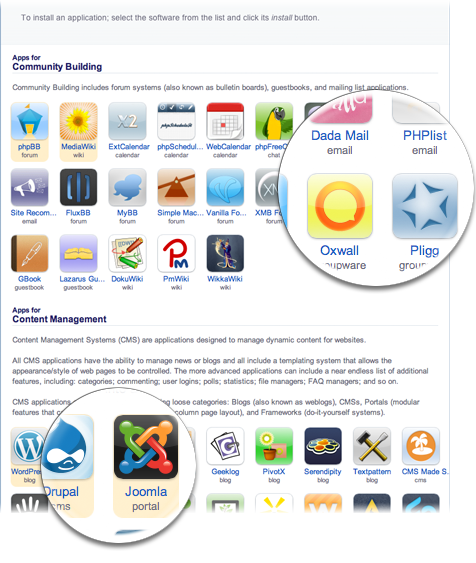
Rapid and reliable application updates.
Applications are regularly updated as new versions are released. We understand the necessity of rapid security release availability and have designed our workflow to guarantee security releases and other critical bugfix releases are tested and deployed within hours of release by the application vendor, including holiday and non-business day releases.
New applications evaluated regularly.
Feedback and suggestions guide our evaluation of new and unique applications. When an application meets our standards, we contact the vendor for approval, package the application for inclusion, and publish the application package.
Categorized by purpose.
To guide website owners in selecting the most suitable application for the task at hand, applications are categorized by their intended purpose, and each category includes a helpful description.
Search and filter available applications.
Applications can be searched by keyword, enabling website owners to quickly find a specific application or type of application.
Applications can be filtered to only display if they're capable of being installed in the website owner's native language, and applications can be filtered to only display if no database is required.
Centralizable and Scalable.
Instead of installing Installatron Server on each web hosting server individually, Installatron Server is most commonly installed on one or more centralized servers, significantly simplifying the deployment.
FTP(S), SSH, SFTP, NFS, and local filesystems are supported
Transparent FTP(S), SSH, SFTP, NFS, or local filesystem layers are utilized to manage web applications on remote web hosting accounts. The end result is a centralized solution that vastly simplifies maintenance tasks.
Scalable as growth demands
Installatron Server servers can be clustered, and additional servers can be added to a cluster as growth demands. Installatron Server data is seamlessly shared between the clustered servers.
 Services the entire application lifecycle.
Installatron Server services the entire application lifecycle, from discovering and installing an application, updating as new versions become available, enabling backup, restore, migration and clone functionality, and one day safely uninstalling the application.
Discover an application.
Website owners can browse, search, and filter available web applications, find information about each application, view usage screenshots, sample websites, version-to-version changes, take the application for a test drive, see related applications, and discover links to homepages, documentation, FAQs, support forums and more.
View sample websites. NEW
Showcase highlights websites powered by an application to demonstrate to website owners the range of capabilities provided by the application.
Take an application for a test drive.
Live Demo empowers website owners to test drive and evaluate applications by providing pre-installed instances of each application. Live Demo resets each instance every couple of hours, and multiple instances per application are available to minimize parallel usage conflicts and enable evaluation of different languages and configuration options.
Server administrators can optionally use the Live Demo Server tool to host an instance of Live Demo on the local server.
Install any version, in any localization, anywhere.
Applications can be installed anywhere within the HTTP and HTTPS directories of all domains, sub-domains, addon-domains, and the account's server home directory. This includes the root-directory, any sub-level directory, international domains (IDN's), and even HTTP password protected directories.
All versions are available.
Unless restricted, any version of the application can be installed, and multiple install options are available to select the desired language, sample data configuration, and more. However, Installatron always defaults to installing the latest version in the website owner's native language.
All localizations are available.
An effort is made to publish every complete localization that is supported by the application vendor. Most applications are available in 30+ languages. Furthermore, when installed applications are updated the installed localization is updated too.
Update as new versions become available.
As new versions become available installed applications can be updated. When an installed application is updated the installed language translation is updated to match the new version, and for WordPress specifically plugins and themes can also optionally be updated. The option to create a backup is always provided prior to starting any update process.
Immediate email notification.
Website owners are optionally notified by email immediately as a new version of an installed application becomes available. Security releases and versions that introduce significant changes are further identified to provide better distinction from regular minor versions.
Stay up to date automatically.
Installed applications can be configured to automatically backup and automatically update immediately as new versions become available, with the ability to only automatically update to new minor versions and security releases, or automatically update to any new version. In the event an automatic update fails, the created backup is automatically restored.
Monitor version-to-version changes. NEW
A log of application changes from version-to-version is integrated right into the Installatron workflow, and each version is classified to distinguish between critical security releases, versions that introduce significant changes, and regular minor versions.
Backup and restore installed applications.
Backups of installed applications can be created, rapidly compressing the application's files and database tables into a gzip-compressed archive that can optionally be downloaded to conserve disk space. Whenever necessary, backups can be restored to return the application to the state it was in when the backup was created, whether or not the original application is still installed.
Backup to FTP, FTPS, SFTP/SSH, and Dropbox. NEW
Installed applications can be backed up to FTP, FTPS, SFTP/SSH, and Dropbox instead of or in addition to the local server. Server administrators and resellers can fully configure which options are available.
Maintain backups automatically. NEW
Enabled at install time or later by editing an installed application, Automatic Backup will automatically maintain installed application backups based on the selected schedule. Backups are created, rotated and deleted between midnight and 6AM server time to maintain the selected schedule, and a failed backup will never rotate a working backup. Automatic Backup can maintain backups on the local server or at FTP/FTPS/SSH/Dropbox and cloud locations (entirely configurable the server administrator).
Set a backup label. NEW
Backups can be organized with a label that better describes exactly why the backup was created.
Restore to any location. NEW
Backups can be restored to any location. Use a backup as the basis for a new installation, or restore a backup overwriting the source install.
Clone/duplicate installed applications.
Clone is a revolutionary feature that enables installed applications to be duplicated to a different location. Clone can be used to test an upgrade before applying it to a production install, to create a sandbox to test mods, plugins, or themes, or simply to duplicate an installed application. The uses for Clone are endless!
Clone anywhere.
Any account location is a valid destination, including the root directory and any sub-directory of all sub-domains, addon domains, and domain aliases. All files, directories, and database tables are duplicated, and application settings are updated for the new location.
Optionally use different settings. NEW
When cloning an installed application the settings for the destination installed application can either be inherited from the source installed application or new values can be set. Examples of settings include the administrator login and email, site title and localization, automatic update configuration, and more.
Clone between accounts.
Clone can also be used from the Server Administrator and Reseller logins, enabling installed applications to be cloned between accounts.
Import and/or migrate existing installed applications.
Existing installed applications can be imported into Installatron Server, and applications installed on remote web hosting servers can be migrated to any location within the local web hosting account by utilizing the remote server's FTP, FTPS, or FTPS/SSH information.
Uninstall applications.
When an application is no longer needed it can be removed safely. Only files and database tables known to be associated with the installed application are removed, nullifying the risk of unintentionally deleting other files and database tables.
A focus on WordPress. NEW
WordPress is one of the most popular applications available today. WordPress has a particular focus throughout Installatron Server.
One-click plugin and theme updates.
Installatron Server can update WordPress plugins and themes just as it does WordPress itself. WordPress plugins and themes occasionally suffer from security vulnerabilities that require plugin or theme updates to keep a website secure. Traditionally this would require updating the affected plugin or theme for each website individually, but with Installatron Server the process is automated and no more than a couple clicks.
Automatic updates for WordPress plugins and themes.
Stay even more uptodate by configuring WordPress plugins and themes to automatically backup and update as new versions become available. This setting defaults off as plugin and theme updates can cause websites to break (resellers and server administrators can change the default).
Single Sign On (SSO)
Using the administrative link now automatically logs the session right into the WordPress administrative area using a secure login method.
International.
Installatron Server is used in all corners of the globe. To serve an international market, Installatron Server has been developed from the ground up to support international domain names, multi-lingual applications, user-interface localizations, and more.

28+ User-interface Localizations.
The Installatron Server user-interface is available in more than 28 languages, including but not limited to Chinese, Danish, Dutch, Finnish, French, German, Hebrew, Hungarian, Indonesian, Italian, Norwegian, Polish, Portuguese, Romanian, Russian, Spanish, Swedish, and Turkish.
Right-to-Left and Unicode Localizations.
Installatron Server supports multidirectional text rendering, allowing user-interface localizations to display characters from right to left, and all localizations are created in Unicode, the accepted international encoding standard.
Easily customize and add localizations.
Installatron Server user-interface translations can easily be customized and added for unsupported localizations using the Installatron Collaborative Translation Editor.
Full IDN support.
Installatron Server supports the Internationalized Domain Names (IDN) standard, enabling applications to be installed and maintained on non-English websites.
Install and Upgrade in different languages.
Save considerable time by using Installatron Server to install and upgrade applications in different languages. When an application is upgraded, the installed language package is also updated.
An effort is made to publish every complete localization that is supported by the application vendor. Some applications, such as MediaWiki, are available in 50+ languages.
Read more: FAQ: How many languages are the applications available to be installed and upgraded in?
Read more: Installatron Collaborative Translation Editor
Profitable.
Installatron Server makes it easier than ever to deploy and manage web applications. Fast-track business growth and customer satisfaction by empowering your customers with Installatron's premier library of easy-to-use web applications. They'll thank you for it.

Improve customer retention, Attract new customers.
Add tremendous value to web hosting packages by empowering customers that otherwise wouldn't know where to begin to deploy web applications. Potential customers will be more likely to purchase after seeing what's possible with Installatron Server, and existing customers will be more likely to renew after experiencing just how easy Installatron Server makes managing web applications.
Upsale customers to larger packages.
In addition to adding value to existing packages, Installatron Server empowers server administrators and resellers with tools to upsale customers to larger packages.
Application Access Control and Disabling.
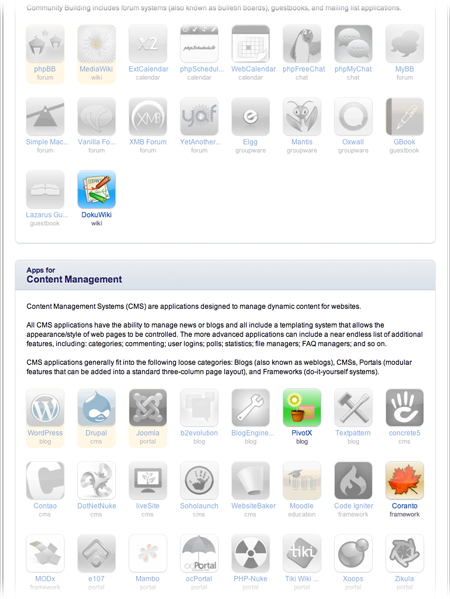
With Access Control, resellers and server administrators can limit access to applications per customer or web hosting package. Completely deactivate specific applications, or display specific applications in a disabled state until the customer follows an embedded link to a billing system that can automatically upgrade their account. In the image on the right, applications that require MySQL are disabled due to the customer being assigned a web hosting package without MySQL databases.
Quotas.
Quotas limit the number of installed applications or backups customers can have at the same time. A customized message is displayed when a quota is exceeded until the customer follows an embedded link to a billing system that can automatically upgrade their account. All quotas can be configured per customer or web hosting package and are applied per account or per domain. Application Quotas support multiple applications per quota, and Backup Quotas can be set differently for each backup location, with support per megabyte or per backup count restrictions and the ability to prune old backups.
Increase company website traffic.
Installatron Server can increase traffic to your company's website by optionally adding a theme-matching and completely configurable "hosted by" link to each installed application.
Recover server disk space. NEW
Recover significant server disk space by switching application backup storage from the local server to a remote location. Administrators and resellers can add a custom backup location for website owner use and disable the "local server" backup location. Any FTP, FTPS, SFTP/SSH, or Dropbox account can be used as the basis for the custom backup location, and quotas for the custom backup location can be enabled through the Backup Quotas feature.
We care about your success.
Our customers guide all product development through open communication channels. Through excellent feedback, customer surveys, and some complaints too, our customers have moulded Installatron Server into a solution that does precisely what they require.
Partner Program.
Medium and large providers benefit from becoming an Installatron Partner, which enables further licensing discounts and strengths the relationship between Installatron and the provider. We're 100% committed to our partners' success.
Read more: What is Installatron Server?
Website Owner UI.
Drawing on case studies and feedback received over the past nine years, the Installatron Server user-interface has been refined to provide an experience that is powerful, elegant and intuitive for even the most inexperienced website owners. Website owners will pick up Installatron Server in seconds or minutes, not hours or days. Signifiant user-interface changes are focus group tested, so you can rest assured Installatron Server will always be incredibly simple and intuitive.

Universal search and filtering bar.
A universal search and filtering bar streamlines searching for and filtering available applications, installed applications, and backups.
Standardized one-click workflow.
The workflow of all tasks, from installing to upgrading and restoring, use a standardized "one click" navigation and workflow. Instantly intuitive to new website owners, this model enables tasks to be completed rapidly and without navigating through multiple steps or pages.
Standardization across all tasks gives Installatron an almost horizontal learning curve.
All tasks execute in the background.
Installatron Server launches every task as a managed background process, enabling an accurate task progress bar and freeing the website owner to perform other tasks or even log out of the control panel while the task completes.
Website owners are optionally notified by email as tasks complete, and tasks are intelligently managed such that if one task fails, any queued tasks for the same installed application are aborted.
Time-saving multi-select options.
Website owners with multiple installed applications will appreciate the availability of standardized multi-select options, enabling tasks to be grouped so that, for example, a series of upgrades or backups can be performed as a single process.
Application preview images. NEW
Installed applications are easily identifiable through preview images displayed on the My Applications tab.
Tooltips.
Many buttons have informative tooltips that provide that little bit of extra information to help clarify exactly what the button does.
Graceful error handling.
When an error occurs, the technical information is logged and a short message in layman's terms is displayed to the website owner. Website owners aren't inundated with technical information they won't be able to use.
Administrator UI.
Installatron Server has many advanced and comprehensive administrative controls that make managing a server with Installatron a breeze. Here's just a few highlights.


Different customer. Different configuration.
The User Group system incorporated into Installatron Server enables nearly all settings to be configured differently for specific website owners and web hosting packages.
Application Control.
The Access Control tool enables server administrators and resellers to precisely control which applications are available to specific website owners and web hosting packages. Applications can be deactivated, flagged as disabled for installation, highlighted as featured, and more.
Exhaustive branding and white label support.
Installatron Server has been designed from the ground up with seamless integration of a company brand and/or website theme in mind.
The Installatron name can be changed, user-interface CSS and images can be modified, email templates can be modified, control panel icons and links can be modified, all text displayed throughout the user-interface can be changed, and backups and other datafiles use a generic structure that doesn't reveal Installatron. Even the buttons linking to Installatron within the control panel theme can be renamed differently for different website owners and web hosting packages.
Application Templates. NEW
Create and manage pre-configured application templates for website owners to choose between for new installations. It's even possible to entirely replace the default template.
Feature Control.
Control precisely which features are enabled. Don't want to offer installed application backup and restore functionality? Don't want to offer installed application clone functionality? These options and more are available to be turned off.
Define custom backup locations. NEW
Administrators and resellers can define their own backup locations for website owner use. Any FTP, FTPS, SFTP/SSH, or Dropbox account can be used as the basis for the custom backup location, and quotas for the custom backup location can be configured through the Backup Quotas feature.
Access owned accounts through the administrative panel. NEW
Server administrators and resellers have full access to owned accounts right through the administrative panel, without the need to log in as the owned account. All features are available; applications can be installed, imported, and migrated, and installed applications can be upgraded, cloned, edited, backup/restored, and uninstalled.
Clone installed applications between accounts.
Server administrators and resellers can clone installed application between different accounts right through the administrative panel.
Force update out-of-date installed applications and WordPres plugins and themes.
Server administrators and resellers can forcibly upgrade any installed application on the server, and installed applications can be configured to automatically upgrade as new versions are released, if desired. WordPress plugins and themes can also be forcibly updated through the same system.
Extendable.
Installatron Server is designed to be easily extended with additional application packages, modifications to existing application packages, a full suite of automation APIs, and more.
Open application packaging format.
Installatron's open application packaging format enables anyone with minimal programming knowledge to create application packages, for any web application. There's even an online Application Package Editor to simplify the task further!
Application modification system.
In addition to the ability to create whole application packages, a modification system is included that enables changes to be made to any version of any application we offer. This system can be used to add additional languages, add plugins or templates, or make just about any customization. Best of all, the system is designed to be simple and only requires very minimal programming knowledge!
Automation APIs.
Installatron's Application Programming Interface (API) is a development interface that enables developers and system administrators to directly interface with all Installatron systems. In fact, the Installatron Server GUI is built using the same API. Both a HTTP API that accepts JSON input and a command-line based API are available.
WHMCS and billing system integration.
It's easy to configure WHMCS and other billing systems to pre-install applications and execute other tasks as new web hosting accounts are provisioned. Documentation and sample billing system modules are included to jump start integration.
Read more: Documentation: Application Packaging SDK and Guide
Read more: Documentation: Application Package Modification and Customization Guide
Read more: Documentation: Installatron Server API and Install Automation Guide
Read more: Documentation: WHMCS billing system integration
Seamless security.
From conception security consciousness has been a central design goal for Installatron Server. However, our security consciousness doesn't end with our product — we also guarantee rapid deployment of application security releases to help ensure customers' installed applications are secure too.
Tasks execute with user privileges.
Installatron Server executes all website owner tasks with user-level privileges, avoiding potential security flaws introduced when tasks execute with root-level privileges.
Password privacy.
When applications are installed a secure administrative login password is suggested, and Installatron Server does not cache or retain the chosen password.
Rapid updates. Guaranteed.
Installatron's Rapid Update Guarantee delivers application security releases 24/7/365. We understand the necessity of rapid security release availability and have designed our workflow to guarantee critical security releases are tested and deployed within hours of release by the application vendor, including holiday and non-business day releases.
We have a solid track record of delivering on this promise — don't leave your customers vulnerable by our competitors' inability to rapidly deliver security releases.
Stay up to date. Automatically.
Updates to application and localization packages are automatically downloaded once per day.
When a new application version becomes available, website owners with installed instances of the application are notified by email of the new version (can be disabled), or alternatively, installed applications can be configured to automatically backup and update as new versions become available, significantly reducing the amount of time installed applications are vulnerable to security exploits.
Automatic Update can be configured to only update to new minor versions and security releases, or it can be configured to update to any new version. In the event an automatic update fails, the created backup is automatically restored.
Rock-solid reliability.
Installatron Server is designed to maximize compatibility while minimizing maintenance and requirements. All server configurations supported by a control panel are also supported by Installatron Server, and the server administrator should never need to service Installatron Server after it's installed.
100% hosted on your server.
Installatron Server is installed on and hosted by your server entirely, guaranteeing the highest reliability and smoothest website owner experience. No connection to Installatron's licensing servers is necessary for regular operation.
Tested throughly. Highly compatible.
Testing is completed on hundreds of server configurations; on Linux, CloudLinux, Debian, FreeBSD, and Windows, on many VPS systems, on Apache, Lighttpd, and Nginx, with and without common server features like suphp, fastcgi, mod_ruid, and safe_mode, and no conflicts arise from operation alongside other auto-installers and common third-party software.
Staggered release channels.
Installatron Server core version updates utilize three release channels -- edge, release, and stable -- which can be used to ensure new features and additions have reached maturity prior to introduction.
Server administrations can choose to manage Installatron Server versioning themselves by selecting the do not upgrade option, which turns off automatic updates for the Installatron Server core.
Optional RPM and Debian packages and package repository.
Rather than relying on Installatron's staggered release channels, RPM and Debian packages are available to enable server administrations to manage Installatron Server versioning using standardized packages from the Installatron package repository.
Self-healing.
An Installatron Update/Repair utility is actively developed and is designed to fix most problems that can occur with Installatron Server. This utility can be executed any time difficulties are experienced—there is no harm in executing the utility; it's always the first thing to try.
An easy uninstall.
Step-by-step instructions to remove Installatron Server from a server are available for all supported control panels. Once removed, no trace of Installatron Server will remain on the server.
Read more: Installatron Server Server Requirements
Read more: Installatron Server Uninstallation
Comprehensive Support and Documentation.
Anytime a little help (or a lot) is required, rest assured the Installatron team will respond professionally in a timely fashion. Both ticket-based and email support is available at no additional cost.
No canned responses.
Every response from our support team is hand-crafted to the individual problem. We don't use scripts, templates or canned responses to solve problems — our customers deserve more.
Comprehensive documentation.
Everything from troubleshooting information, billing system integration guides, full API documentation, an application packaging SDK, localization information, and more is available through the Installatron Support portal.
Website owner and administration guides.
Full website owner and administration guides are available at no additional cost through the Installatron Support portal. These guides can also be downloaded in HTML format and rebranded.
Optional 24/7/365 emergency phone support.
24/7/365 emergency phone support becomes available for critical issues that require immediate attention.
Read more: Installatron Support Portal